Experiment: Windows VM Performance in Harvester
Overview
This experiment evaluates the CPU performance of a Windows Server 2022 virtual machine running on Harvester. The goal is to identify which virtualization and CPU-topology settings have the greatest impact on benchmark results.
Environment
| Component | Configuration |
|---|---|
| Host | HP server with two Intel Xeon E5-2650L v3 (Haswell-EP) processors |
| CPU topology | 24 physical cores, two NUMA nodes, Hyper-Threading disabled |
| Hypervisor | Harvester with KubeVirt/QEMU |
| Host operating system | Immutable SUSE Elemental/SLE Micro |
| Guest operating system | Windows Server 2022 |
| Benchmark | PassMark PerformanceTest |
Factors Affecting Windows VM CPU Performance
The experiment focuses on the following factors:
- vCPU count: How many virtual processors are available to the guest.
- Hyper-V enlightenments: Expose paravirtualized interfaces to Windows, allowing the guest to communicate with the hypervisor more efficiently. Their effectiveness is described in Tuning Windows VM Performance.
- NUMA configuration: Helps the guest schedule work and access memory close to the physical CPU running that work.
- Huge pages: Reduce page-table and address-translation overhead by using larger memory pages.
- CPU model: Host passthrough exposes more of the host CPU’s features to the guest.
The primary question is: which of these factors has the greatest effect on Windows VM CPU performance?
Experiment Design
Three vCPU configurations were tested while keeping guest memory at 8 GiB:
| Configuration | vCPUs | Memory |
|---|---|---|
| Small | 4 | 8 GiB |
| Medium | 16 | 8 GiB |
| Large | 24 | 8 GiB |
Before plotting the results, each metric was normalized to improve readability and make the different benchmark categories easier to compare.
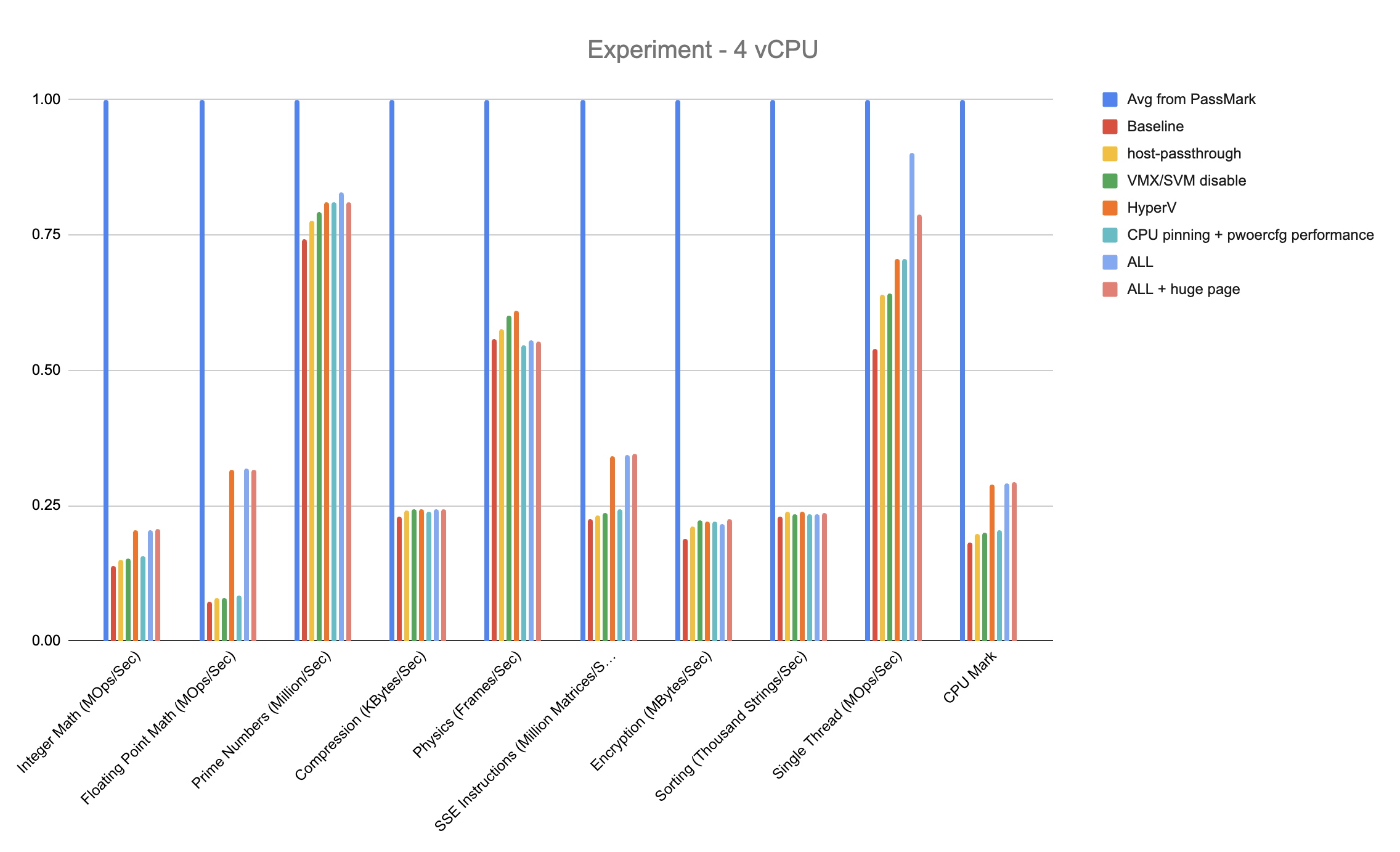
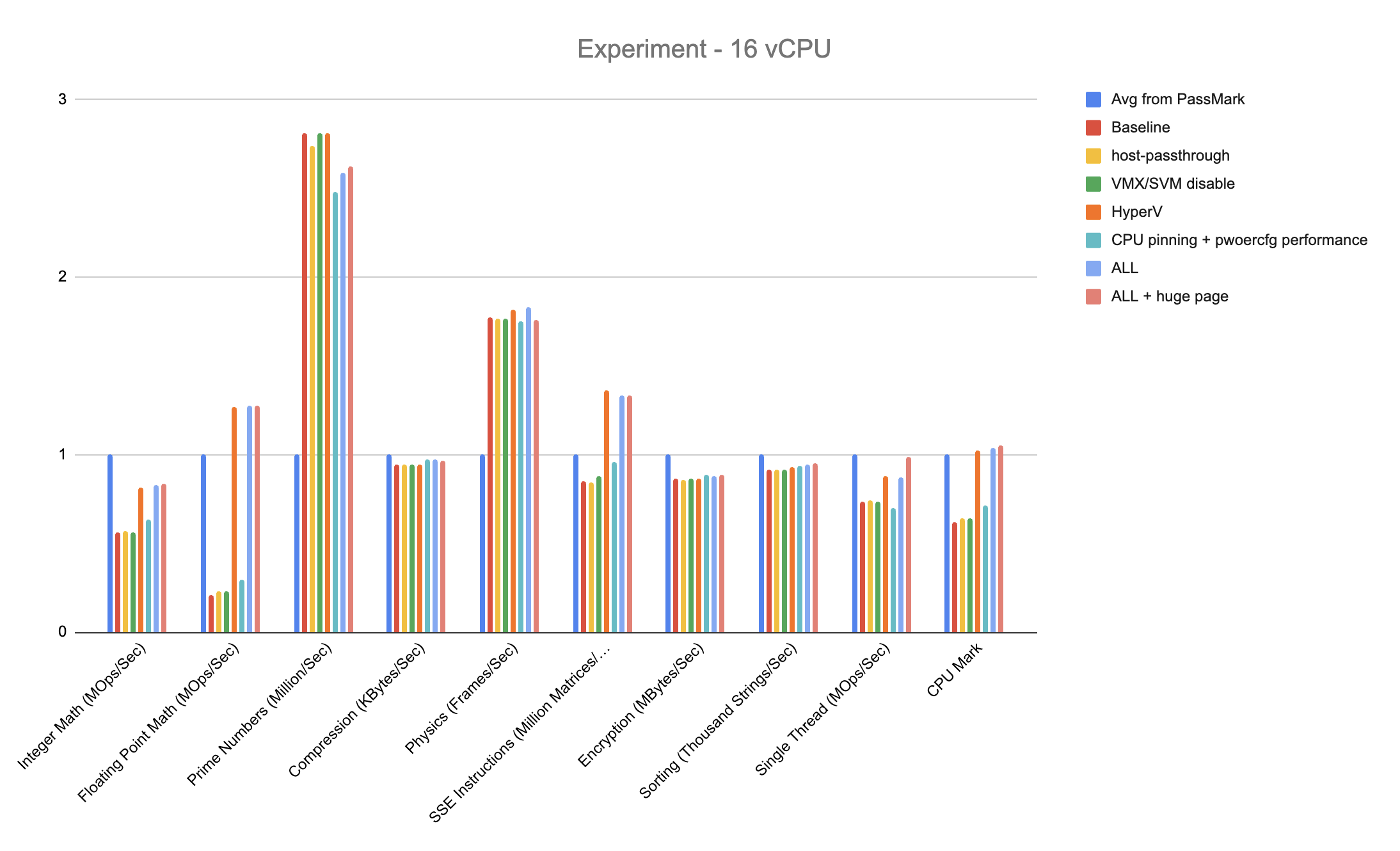
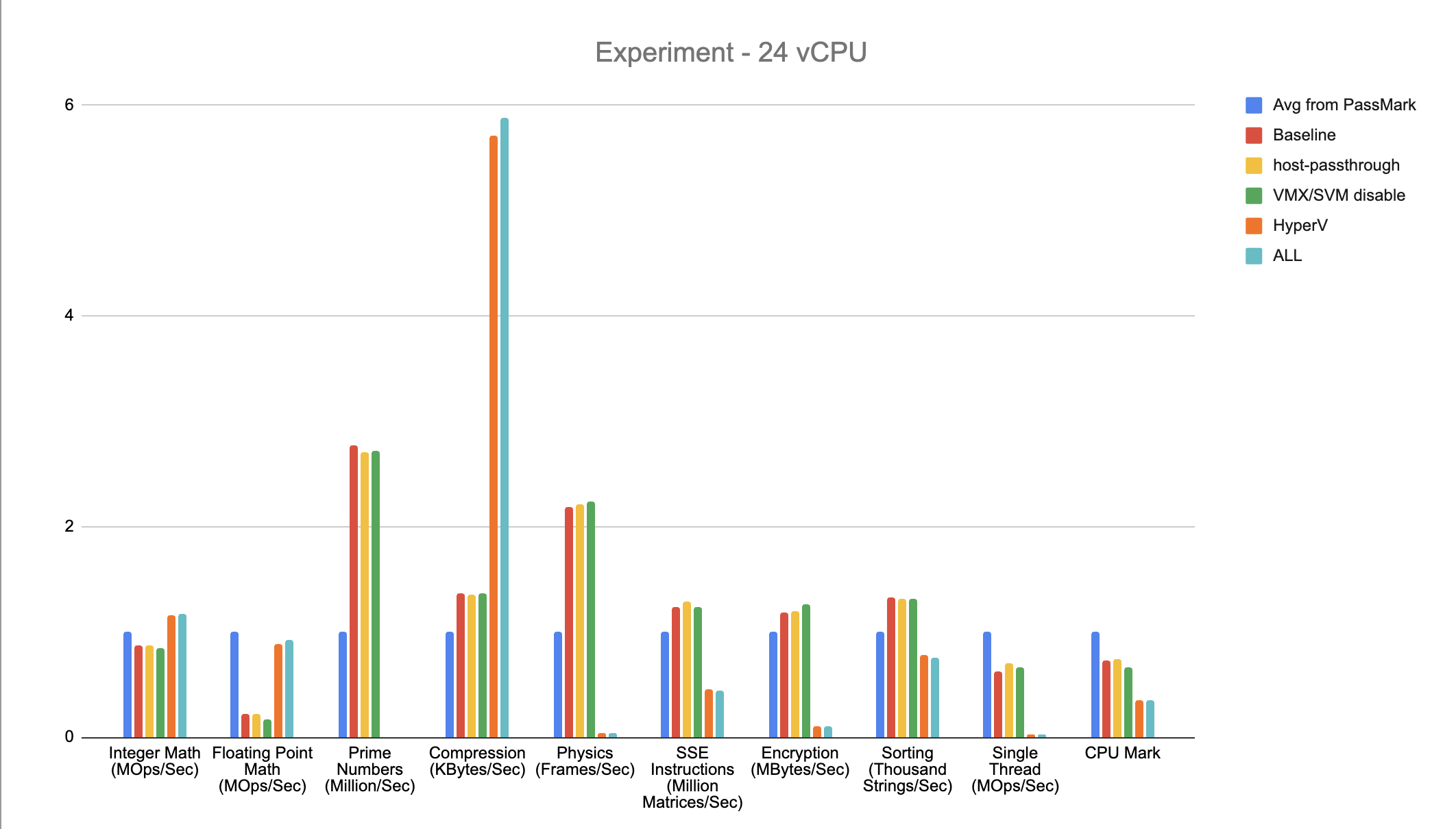
Across all three configurations, enabling Hyper-V generally produced the most noticeable performance improvement, particularly in several multi-threaded workloads. Other optimizations—such as host passthrough, CPU pinning, power settings, and huge pages—provided smaller or workload-specific gains.
VM Configuration in YAML
The following yaml shows the final tuning results. Disk, network, and volume definitions are omitted because they are unrelated to CPU benchmarking.
apiVersion: kubevirt.io/v1
kind: VirtualMachine
metadata:
  name: windows-server-2022
spec:
  runStrategy: RerunOnFailure
  template:
    spec:
      domain:
        cpu:
          # Expose the host CPU features to the guest.
          model: host-passthrough
          # Pin vCPUs to dedicated physical CPUs on the host.
          dedicatedCpuPlacement: true
          # Run the QEMU emulator thread on an additional dedicated pCPU.
          isolateEmulatorThread: true
          sockets: 4
          cores: 1
          threads: 1
          # Expose the host NUMA topology to the guest.
          numa:
            guestMappingPassthrough: {}
          features:
            # Nested virtualization is disabled for this benchmark.
            - name: vmx
              policy: disable
            - name: svm
              policy: disable
        features:
          acpi:
            enabled: true
          # Enable Hyper-V enlightenments for the Windows guest.
          hyperv:
            ipi: {}
            relaxed: {}
            reset: {}
            runtime: {}
            spinlocks:
              spinlocks: 8191
            synic: {}
            synictimer: {}
            vapic: {}
            vpindex: {}
        clock:
          timer:
            hyperv: {}
        memory:
          hugepages:
            pageSize: 2Mi
        resources:
          requests:
            cpu: "4"
            memory: 8Gi
          limits:
            cpu: "4"
            memory: 8Gi
Mapping the experiment factors to YAML
| Factor | YAML setting | Purpose |
|---|---|---|
| CPU model | domain.cpu.model: host-passthrough | Exposes the host CPU model and instruction-set features to the guest. |
| VMX/SVM | domain.cpu.features with policy: disable | Disables nested virtualization because the guest does not need to run another hypervisor. |
| Hyper-V | domain.features.hyperv and domain.clock.timer | Enables Hyper-V enlightenments and paravirtualized Windows timers. |
| NUMA | domain.cpu.numa.guestMappingPassthrough: {} | Exposes the host NUMA topology to the guest so CPU and memory placement can be aligned. |
| Dedicated CPU | domain.cpu.dedicatedCpuPlacement: true | Requests CPU pinning through the Kubernetes CPU Manager. |
| Emulator thread isolation | domain.cpu.isolateEmulatorThread: true | Runs the QEMU emulator thread on an additional dedicated pCPU to reduce contention with the VM’s vCPUs. |
| Power policy | Windows guest command: powercfg /setactive SCHEME_MIN | Selects the Windows High performance power plan. This is a guest OS setting, not a VM YAML field. |
| Huge pages | domain.memory.hugepages.pageSize: 2Mi | Allocates guest memory using 2 MiB host huge pages. |
Results
The experiments indicate that enabling Hyper-V enlightenments had the largest positive effect on Windows guest performance. CPU host passthrough also improved performance, but the improvement was comparatively modest. NUMA placement, huge pages, and additional vCPUs provided smaller, incremental gains under this workload.
The results also suggest that assigning more vCPUs does not automatically produce a proportional increase in every PassMark score. Additional vCPUs are most useful for multi-threaded workloads; single-threaded performance is primarily determined by the performance of an individual physical core and the amount of virtualization overhead.
Takeaways
- Hyper-V enlightenments had the greatest impact on Windows VM CPU performance.
- CPU host passthrough provided a smaller but measurable improvement.
- NUMA alignment and huge pages are useful tuning options, especially for larger VMs, but their benefit was incremental in this experiment.
- When optimizing a Windows VM on Harvester, enabling the appropriate paravirtualized Hyper-V features should be the first priority, followed by CPU model and NUMA tuning.
- comparable metric is Single Thread (MOps/sec), because it uses one core regardless of the total number of cores or vCPUs available.